Loggbehandling är en viktig aspekt av serverövervakning, och administratörer måste konfigurera systemets loggrutin för optimal prestanda. Den här guiden visar hur du justerar schemat för bearbetning av loggfiler i WHM för att optimera när servern processar och arkiverar loggdata.
Så här gör du
-
Steg 1: Logga in på WHM
För att komma igång måste du först logga in på ditt WHM-rotkonto. Gå till din kundportal på portal.internetport.com, och navigera till serverhanteringsavsnittet där du hittar länken till WHM.
-
Steg 2: Öppna Serverkonfiguration
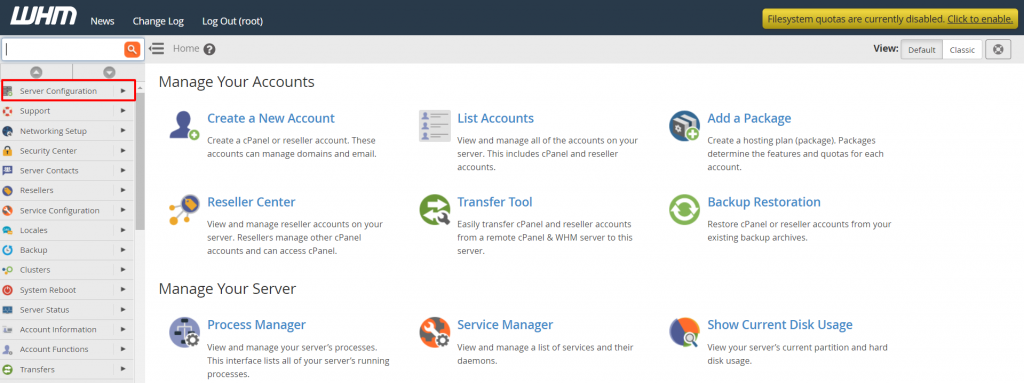
När du är inloggad i WHM, leta reda på den vänstra navigeringsmenyn. Här klickar du på "Serverkonfiguration" för att komma till inställningar som rör serverns grundläggande konfiguration.
-
Steg 3: Välj Konfiguration av statistikprogramvara
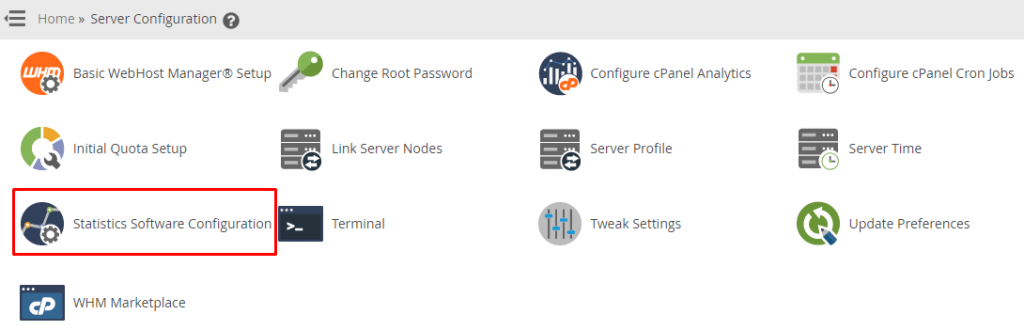
I fönstret som öppnas under "Serverkonfiguration", leta reda på och klicka på alternativet "Konfiguration av statistikprogramvara". Detta kommer att leda dig till gränssnittet där du kan ändra inställningar för de olika statistikprogramvarorna som används på servern, inklusive schemat för loggbehandling.
Gränssnittet för konfiguration av statistikprogramvara kommer att vara tillgängligt.
-
Steg 4: Justera schemat för loggbehandling
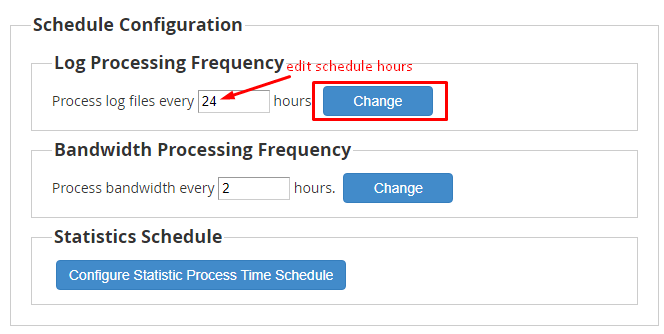
Rulla ner i gränssnittet tills du når avsnittet "Schemakonfiguration". Här ser du olika inställningar relaterade till scheman för olika uppgifter. För att ändra schemat för loggbehandling, leta reda på alternativet för "Loggbehandlingsfrekvensen" eller liknande beroende på vilken statistikprogramvara du använder. Du kan justera tider och frekvenser enligt dina behov. Tänk på att ändringar i schemat kan påverka serverns prestanda, så det är viktigt att välja tidpunkter som inte samtidigt med andra resursintensiva uppgifter körs.
-
Steg 5: Spara ändringarna
När du har gjort de önskade ändringarna i schemat, är det viktigt att spara dem för att säkerställa att ändringarna verkställs. Detta görs genom att klicka på knappen "Ändra" som vanligtvis finns längst ned i gränssnittet.
Genom att klicka på "Ändra", kommer WHM omedelbart att uppdatera schemat för bearbetning av loggfiler på servern. Detta innebär att de nya inställningarna för loggbehandlingsfrekvensen kommer att gälla från nästa körning enligt det angivna schemat.
Tips: När du justerar loggbehandlingsrutiner, tänk på att för mycket bearbetning av loggar kan påverka serverns prestanda. Det är därför viktigt att hitta en balans som tillåter effektiv övervakning samtidigt som det inte påverkar användarupplevelsen negativt.