En parkerad domän fungerar som ett alias eller en sekundär domän som dirigerar till en användares primära domän. Besökare till en parkerad domän omdirigeras automatiskt till den primära webbplatsen. Den här guiden visar hur du parkerar en domän på din WHM-server.
Så här gör du
-
Steg 1: Logga in på WHM
För att börja med, öppna webbläsaren och gå till din Internetport kundportal på portal.internetport.com. Här hittar du dina inloggningsuppgifter för WHM. Klicka på länken till WHM under "Dina tjänster" och ange ditt användarnamn och lösenord.
-
Steg 2: Navigera till DNS-funktioner
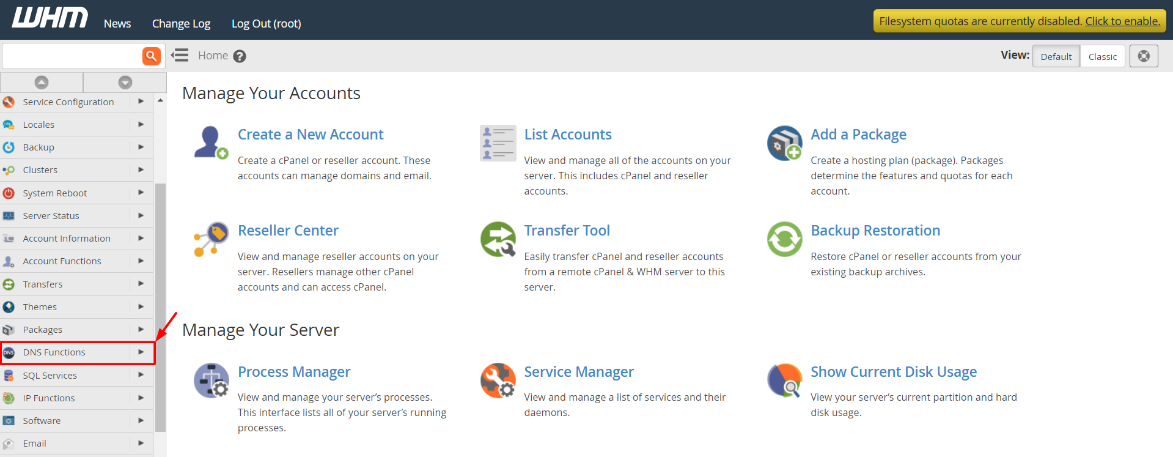
När du är inloggad i WHM, leta reda på menyn längst upp eller till vänster. Härifrån väljer du "DNS Functions" för att öppna en lista över olika DNS-relaterade alternativ.
-
Steg 3: Välj "Parkera en domän"
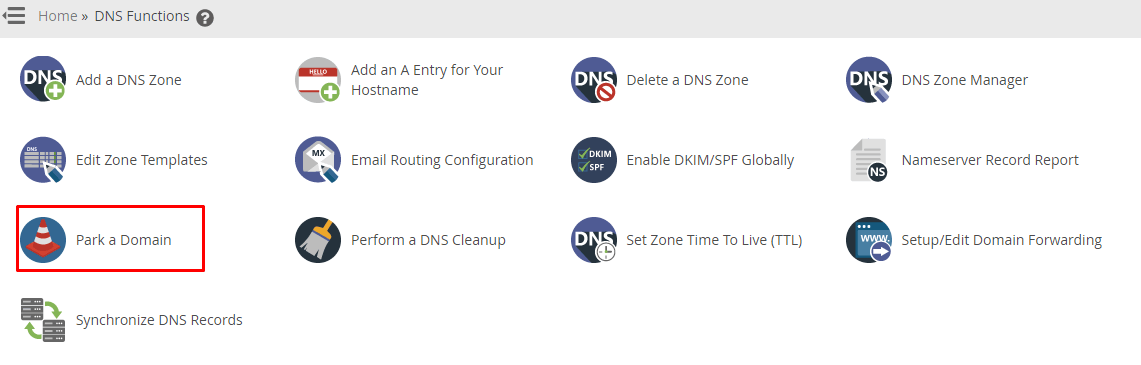
I menyn under DNS Functions, klickar du på "Park Domain". Detta alternativ låter dig parkera en ny domän till en redan existerande primär domän.
-
Steg 4: Välj primär domän
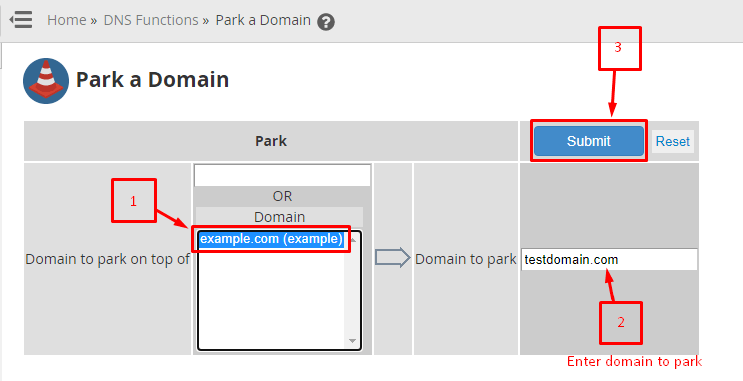
I fältet "Addon Domain" eller "Primary Domain", väljer du den domän som du vill att parkerade domänen ska peka på. Detta är din huvudwebbplats där besökare kommer att omdirigeras.
-
Steg 5: Ange domänen att parkera
I fältet "Domain to Park", skriver du in den fullständiga domännamnet som du vill parkera. Se till att inkludera både underdomänen och toppdomänen (till exempel www.exempel.se).
-
Steg 6: Skicka begäran
När du har fyllt i alla nödvändiga uppgifter, klickar du på knappen "Park Domain" för att skicka din begäran. Systemet kommer att bearbeta din parkeringsbegäran och presentera ett bekräftelsemeddelande om att domänen har parkerats.
Obs: Det rekommenderas att registrera domännamnet omedelbart efter att du parkerat det. Helst bör detta göras innan besökare försöker komma åt den parkerade domänen. För att säkerställa att allt fungerar korrekt, kontrollera att DNS-inställningarna för din parkerade domän är korrekt konfigurerade i din registartors kundportal.
För ytterligare hjälp eller om du stöter på problem under processen, tveka inte att kontakta Internetports supportavdelning. De är alltid här för att hjälpa dig med eventuella frågor eller tekniska problem.